Showing posts with label Tip and tricks. Show all posts

Star Wars Movie in Command Promt, Watch Hidden Windows Xp Command Prompt Movie Show

Hi friends, This is cool trick in dos command prompt watch star wars clone wars action movie in command prompt. the cool trick works on a client network protocol used on the network connection or LAN Connections Called Telnet.


This Star wars movie is real original ASCII Animation. you want try this cool trick in your PC first you need Internet Connection Must and should.


Step 1 : Click On start Button On the desktop and Select run on start menu.

Step 2 : Type The (Cmd) or (Command) on run dialog Box Press Enter On your keyboard.

Step 3 : A windows appears on desktop then type "telnet towel.blinkenlights.nl"

The Telnet Client User is Automatically Disable in Windows 7 And Windows Vista Operating systems. By Default It Enable In Windows XP. To Enable The Telnet Client On Windows 7 And Vista. Follow The Steps Below.


Step 1 : Click On Start Button then Goto Control Panel.

Step 2 : Click on Switch On Classic View Option On Left Side Of the desktop.

Step 3 : Open Programs and Features.

Step 4 :
Select Turn Windows Features On or off.

Step 5 :
Select the Telnet Client Option only. Not Telnet Server Option On Menu.

Step 6 : Click Ok.

Sending SMS to Any one without your Mobile Number, Sending Anonymous SMS from Web To Mobile

Hi friends, Sending message to mobile without using phone and hiding Mobile number. This Type of the Sms called Anonymous sms. Sending a Anonymous Message To Your Friends. We can Send Message any wear in India without paying of any interest. The websites like www.way2sms.com and www.160by2.com in this website you want to sing up so when your are send any message including your number. But In www.smsti.com we no need to sing up. But you can directly Send Anonymous Sms to your friends. see steps Given Below.


Step 1: First Visit www.smsti.com and the page will similarly look like this.

Step 2: Then Type receiver mobile number In the First Blank Field and The Message Field Type the message You want To Send the Receiver. Press Send Button on Bottom of Right side.

Step 3: The Final Step is enter the conformation Code In the box then Press Agree to Terms Button.

Enjoy Friends Friends Through This Way You Can Send Free Message Through Out India.

How to View Your Friends Contact Phone Numbers in Facebook, Getting Friends List Phone Numbers from Facebook Account

Hi friends, Today We will learn how to know or how to see your friends mobile numbers in Facebook friends list. This will work only the friends who active Facebook in their mobile. This is a very simple trick to know. This 100% work and legal work to do. This is Only for education Purpose Only.


1. login To your facebook accont


2.  copy and paste the code in to address bar

http://www.facebook.com/friends/edit/?ref=tn#!/friends/edit/?sk=phonebook

How To Open Two Firefox Browser In One Tab, Amazing Firefox Hacking Trick

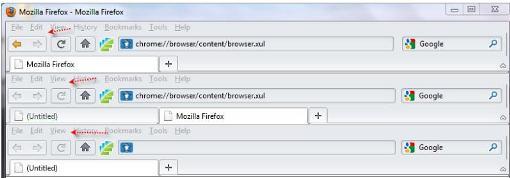
Hi Friends, Today I will Tell A simple magic trick in Firefox. The Trick is Will runs a Firefox web browser we can open another Firefox Browser in the same browser. That is opening two Firefox in one tag. The Trick Works in Only Firefox only. Friends you can browse the internet in two browsers. Follow The Bellow Steps.

  • Open a Firefox Browse
  • Paste The Code In Address bar. "chrome://browser/content/browser.xul"

How To Create A Nameless File And Nameless Folder In Computer, Simple PC Hacking Tip and Tricks

Hi friends, This is a simple magic trick Creating a file are folder without names doing a simple way. Send this file to your friends they think it is an virus But it is not a virus and any thing. actually this is a an invisible letter. This letter value in ASCII Number is '1060'. This Magic trick of  will work 100% and safe and secure able Friends You can also want to do this Follow the Given Step Below.

1) Select a file or floder you want  to create invisible name.

2) Then Right click on it, select 'Rename' or do another simply press 'F2'.

3) Type and hold the 'Alt' key. While holding the Alt key, type numbers '0160' from the number pad.

Note :- Enter Number In Numlock  Number pad Only.

How To Hide An Executable File In To An Image, Convert Exe File In To Jpg File, Sending An Executable File Through Email


How to convert a executable file in to jpeg a image format file. This is very awesome trick. .exe extension file executable file hide in the image format file it can possible. YES, now it is possible. first You want to do this trick first install the winrar software in your personal computer exactly we need the winrar software. Then This Is very tricky follow the below steps carefully.


Step 1 : First create a New folder in c:\ drive and rename the folder private

Step 2: then Copy the files in to the private folder through the files copy any one image named as myimage.

Step 3: Select all the files in the folder and right click on the image file select (Add to "Private.rar").

Step 4: open Command prompt

Step 5: First Type the command cd\ and type copy /b myimage.jpg+private.rar outputimage.jpg then press enter

Now in the private folder created a new file named as outputimage.jpg now your files all are in the image but you double click the file nothing happen. You open the file in Windows Picture and fax viewer it will show you only the image file but you want you personal file open the file in winrar. Now you can upload this jpg file in Email. But the Gmail cannot find this executable File.

Friends It Will Works 100 %. Enjoy With This Cool Trick.

How To Download The Youtube Videos For Free To Your Computer In Mp3 On Mp4

Hi Friends, Do You want to download the you tube Videos in To Personal Computers (PC) Save In To Your Hard Disk. Someone are like some videos in youtube like cinema video song are some science experiments and some other videos. That want Download and watch he video next time. Following This Process you don't want to download any software or installing any software's. This process will start in internet. We have net connection we can download the Video In Youtube. First Follow The Step Given Below :

STEP 1 :
First go to youtube and select the first you want to download in to PC. And Copy the URL of the in video in address bar top of the page.


STEP 2:
Go To the web page of www.keepvid.com of the website to download the youtube videos. Paste The Url Of the You tube video.

STEP 3:
Press Download Button e

The Process of the video Will started. Enjoy cool Videos In Youtube.

How to convert flv video to 3gp by total video converter

so many people asking that an how to convert the flv video file in to 3gp, mp4, mp3, Avi, i pod formats. is it possible. YES, now it is possible. To convert the flv video file. to download the flv to 3gp converters. And add the flv file. select the following format as you like. and convert the video in to any format. This is solution of converting the flv video  file in to 3gp converter.

Download the Video Converter Flv to 3Gp : LINK

how to delete orkut account forever or permanently, Removing orkut profile

Deleting the orkut account forever. only deleting the orkut account in google account. this process will not delete all the google accounts like gmail,web master tools, blogger, google talk e.t.c., use this is only for good purpose. 
  1. open your ourkut account you want to delete account
  2. click setting on top and right of the page
  3. select genral tad and click remove my orkut account
  4. for the confirm type password purpose this account belong you or not so type password and click remove orkut

how to write a rainy effect screensaver program in c language in 16bit and 32bit


Hi friends, Now We can  Form a Rainy day screensaver effect in c language. It is possible. Yes. it is possible. Open the notepad and paste the following source code in notepad and save the file "C:" drive with the name of "RAINY.C". Now Open The Turboc2(C Language) and press F3 and type "C:\RAINY.C". Then Press F2 and Save RAINY.C and Compile the program of press F9 and Press Esc to close the compiler and Now The Execute The Program To Play the Rainy Screensaver effect so Press Ctrl+F9. And Enjoy The Rainy effect.

Source Code:
 
#include<graphics.h>
#include<stdlib.h>
void main(void)
{
int GD=DETECT,GM;
int Maxx,Maxy,i;
initgraph(&GD,&GM,"");
Maxx=getmaxx();
Maxy=getmaxy();
while(!kbhit())
{
setcolor(WHITE);
for(i=0;i<600;i++)
outtextxy(random(Maxx),random(Maxy-50),"/");
cleardevice();
setcolor(RED);
outtextxy(300,450,"www.Techinsite.Blogspot.com");
}
getch();
closegraph();

}

This Program is 100 Percent Works and enjoy.

How to Delete facebook account forever easy step sponsered By techinsite.blogspot.com

Creating The face book account is easy but now onward removing a face book account is quit easy. once we confirm to remove your face book account. follow the steps successfully.

1. Go to the following Face Book Deletion Page .

2. Login With Your Account Login ID and password. that is the account you want you delete. 

3. Click on "Submit" button 
4. Type the password again To conform you are the owner of the account are not.And Type Conform Code In the Box.
the face book account will terminate permanently after 14 days, that means 2 weeks. The interaction between the user and account is between this duration period only.

latest features in windows 7 2011 Specifications Review

Here Is The New Greatest Five New Features of Windows 7.You might want to check out  This article about Windows 7.

1. Opening Multiple Instances Of The Same Program

Sometime You Want To Open The Miltiple Instances Of The Same Program. Like Opening A Another New Second Commad Prompt Or Another Application. Instead Of Opening The Program Again Do You Want Open Another Same Application Quitly Hold Down SHIFT Key And Press left Click On The First Instance In The Windows Taskbar To Open A Same Another Application In Windows 7.

2. Problem Steps Recorder

The Problem Steps Recorder is a sweet little tool in Windows 7 that can be used by the user to record his steps.
All that the user needs to do is start the recorder by entering psr in the Start Menu box and click on Start Record in the program interface. Screenshots will be taken from user actions. It is possible to add comments at any time if the user feels so. The whole recording will be saved as a zip file containing a slideshow of the actions.

3. Pin Favorite Floders

You Have Want To Add A favorite Floder In To Windows Explorer To Able To Access Fastly. Just Drag And Drop The floder To The Favorites Menu. It Will Remain Threr Until You Delet It With The Delete Key Again.

4. Shortcuts To Start Pinned Taskbar Items

Pressing [Win Number] will start a new instance of a pinned taskbar item. You should also note that the items can be dragged and dropped into different positions easily.

5. Moving Windows And Such

Windows 7 introduces New Serveral Keyboard Shortcuts For Windows Management. Some Useful Key Are Flitered Here.

  • [Windows Shift Left Arrow] or [Windows Shift Right Arrow] to move windows from one computer monitor to another.
  • [Windows Left Arrow] or [Windows Right Arrow] to dock windows to the left or right side
  • [Windows Up Arrow] to maximize a window
  • [Windows Down Arrow] to restore or minimize windows
  • [Windows Home] to minimize all windows but the active one

how to delete gmail account managing google accounts

Creating a google account is  easy but now  removing a google account is also made quit easy. Follow this quick steps to remove google account successfully.

1. Sign in to Gmail account

2. Click on the settings of the top of the page.

3. In settings select Accounts and import Tab click "Other Google Account Settings".

4.Click EDIT  in the My products Section.

5. Click on Close account delete all services and info associated with it and fill the required fields.